Apple Image Capture "lossless" TIFF scans might secretly be JPEGs
If you scan with a Canon CanoScan LiDE 400 using Apple's Image Capture on macOS 27, you get JPEG compression artifacts in every file, even when you save in lossless formats like TIFF or BMP. Even though Image Capture is saving in a lossless format, the data it receives from the scanner has already been JPEG-compressed for transport.
The fix is to skip AirScan and talk to the scanner over Canon's own USB protocol, which delivers uncompressed sensor data. That protocol is already implemented in open source by SANE.
What I saw
I bought a LiDE 400 for receipts, mail and old family photos. It has no macOS driver from Canon. It doesn't need one: macOS finds it over AirScan and Image Capture just works.
Then I zoomed in on a 300 dpi scan saved as TIFF and saw DCT compression artifacts, the signature of JPEG. Saving as BMP showed the same artifacts. Picking a lossless format in Image Capture's own menu made no difference, and the app gave me no hint that it wouldn't.
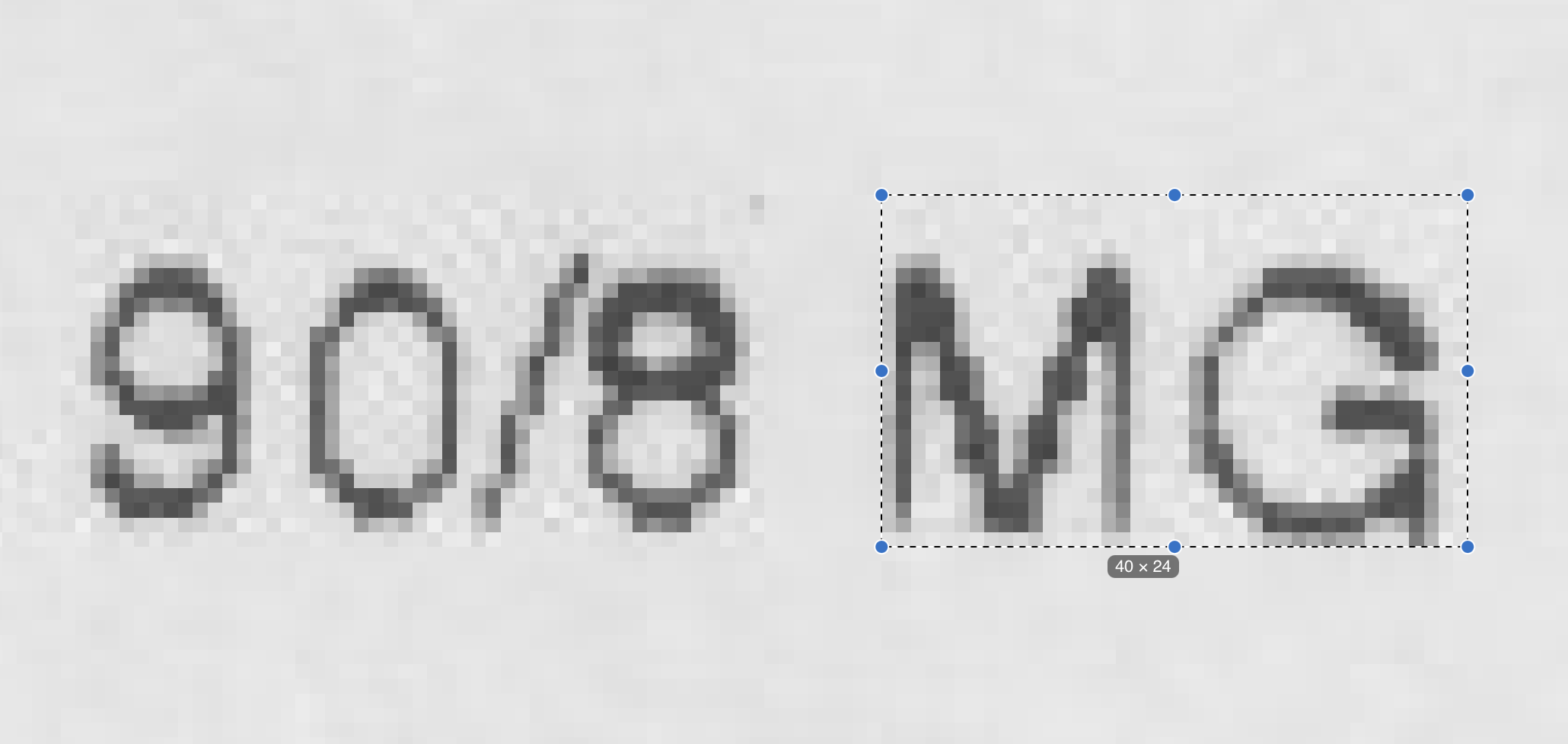
Two other programs on the same machine didn't produce them: VueScan and SANE's scanimage. Both gave clean scans of the same page. So the scanner could do better, and Image Capture was getting something worse than the sensor produces. Nobody told me, and I only found out because I looked at pixels.
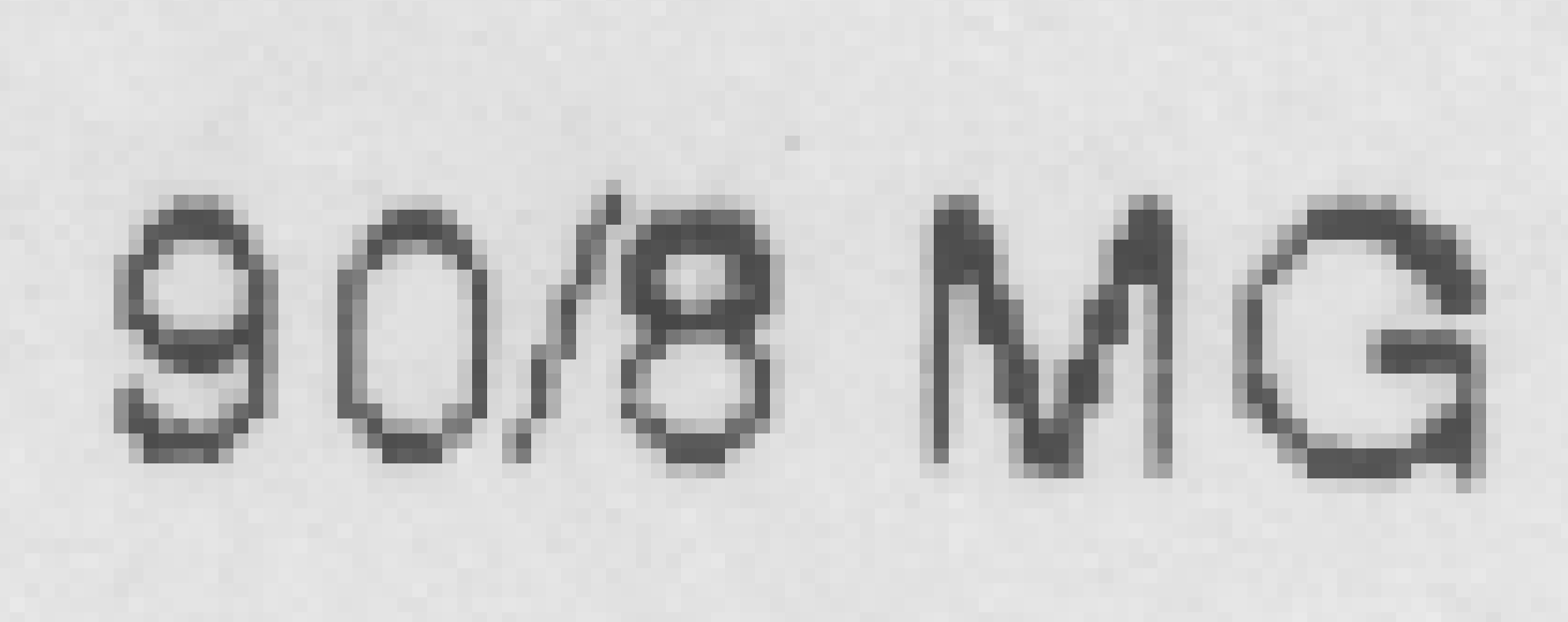
scanimage, enlarged. Cleaner edges and a smoother background. The two crops aren't at identical zoom.What AirScan is
AirScan is Apple's name for driverless scanning. Under the name is eSCL, a protocol (from Mopria, based on HTTP and XML) that lets a client ask a scanner what it can do and then request a scan. Discovery uses Bonjour (_uscan._tcp), the scanner publishes a capabilities document at /eSCL/ScannerCapabilities, and you request a scan by posting a settings document. The pages come back as image data over HTTP.
For a scanner on the network this is great. Nothing to install, and any client that speaks eSCL works. For a USB scanner it works through the same protocol carried over USB (the LiDE 400 has USB interfaces for this), and macOS exposes it as a local eSCL service.
The catch is in that capabilities document. The scanner declares which document formats it can return, and the LiDE 400 lists exactly two: image/jpeg and application/pdf. There is no raw, no PNG, no TIFF. Whatever the client does with the data afterwards, the lossy step has already happened in the scanner's firmware. Image Capture, ImageCaptureCore and any custom eSCL client all get JPEG, so none of them can fix this. Canon chose to offer nothing else over AirScan, and Apple chose to present TIFF and BMP as save options anyway, without saying that the pixels are already degraded.
I checked this against the device when I started the project and recorded it in my notes. I haven't re-run the check for this post, because the scanner isn't plugged in right now.
How open source already solved it
The scanner also speaks a second, older language. Its three USB interfaces are all vendor-specific, and interface 0 carries Canon's "pixma" protocol (generation 5). That's the protocol Canon's own drivers use, and it returns uncompressed image data.
Canon doesn't publish a specification. The SANE project's pixma backend (backend/pixma/pixma_mp150.c) works it out and implements it. That's why scanimage gives clean scans: it never touches AirScan. Everything I did next stands on that work, and I'm grateful for it.
SANE also has a debug mode that logs every USB transfer:
SANE_DEBUG_PIXMA=20 scanimage -d pixma:04A91912_… --resolution 300 --mode Color …
That log turned out to be the most useful thing in the whole project.
What I did with it
I wanted a native macOS app: no Homebrew, no bundled C libraries, nothing to keep building. (I'd started with a Python prototype, scanscan, and retired it in favour of the native rewrite, swiftscan.) So I ported the LiDE 400 path from pixma_mp150.c to Swift on top of Apple's IOUSBHost framework. It's about one scanner's worth of code, and I'm not trying to support others.
Then I checked it against SANE. A full-bed 300 dpi colour scan from my Swift driver and one from scanimage with the same settings came out the same size, with a mean absolute difference of about one level, which is sensor noise. There's no JPEG block pattern. It was also a little faster: about 11 seconds against 14.6.
What I added
The driver is a translation, so what's mine is mostly around it.
The biggest piece is the protocol itself, written down from evidence. I turned SANE's debug logs into a document describing the generation 5 protocol as it appears on the wire: the framing, the checksums, the XML job messages, the command sequence and the layout of the image data. It's written from captures rather than from SANE's source, and every claim says which capture backs it. Where I don't know what a field does, the document has an "unknowns" table with ideas for how to find out, rather than a guess.
The packet layouts are also available in machine-readable form, as Kaitai Struct definitions. I wrote a small capture format (.pxtrace) and a script that converts SANE's logs into it, so traces from SANE and from my driver can be compared directly.
Those traces double as test fixtures. Twelve small scans at different resolutions and modes are stored as full USB traces next to the image SANE produced from them. The test suite replays each trace through the driver, requires the USB messages to be byte-identical, and compares the resulting image to SANE's. That means the driver is tested without a scanner attached.
I also explored a few things the logs didn't cover. I cancelled scans partway through to see how the scanner recovers (it refuses a new job briefly, then accepts one), and I captured the front-panel buttons on the interrupt endpoint so that a press can start a scan.
On the Swift side, the API is built around async scans with cancellation and progress, and rows are converted as they arrive instead of after the whole page. The image writer refuses to be lossy: it saves PNG or TIFF only, and rejects any other extension rather than quietly recompressing.
Caveats
SANE's backends are GPL, and my driver is a translation of one of them, so I don't plan to distribute the app. The code is also hardcoded to this one scanner, with its USB IDs, bed size and command sequence baked in. And getting the raw data removes the compression, but not the other limits of a cheap CIS scanner, such as a very shallow depth of field. That's a separate post.
If you have a LiDE 400 (or similar)
You don't need my app. Install SANE (brew install sane-backends) and use scanimage. If you're stuck with Image Capture, know that "save as TIFF" is a container change, not a quality change, whatever the menu implies. If you're curious whether a scanner you already own is affected, ask it what it can return: fetch /eSCL/ScannerCapabilities from its eSCL endpoint and look at the document formats it lists.